
PDF Reader Pro - Annotate,Edit,Fill,Sign1.5.4 - Google Play
You'll be able to see results in few seconds.
Publisher Description
* The worlds No.1 PDF reader app on Apple Mac App Store
* Installed on over 50 million devices in over 200 countries around the world
* Best Business pdf app iPhoneAppsPlus.com
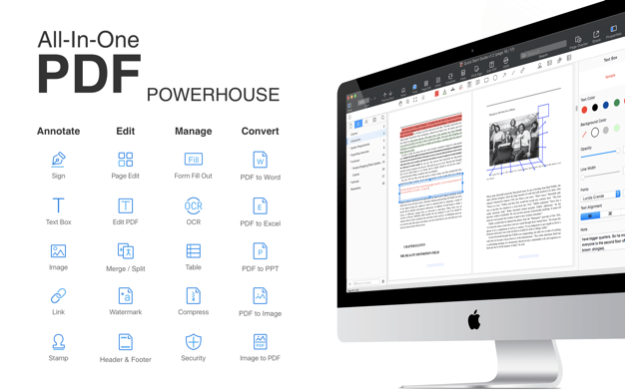
Get the all in one PDF office to view, comment, edit, sign, fill form, and share Adobe Acrobat Reader PDF on smartphones, tablets, and even on PC/Mac.
Reliable, stable and fast PDF viewing engine and smooth liquidtext navigation. Complete PDF support and compatible with Adobe PDF Reader Pro and other PDF viewer (such as Xodo, Foxit, PDF Expert, PDFelement, GoodReader, Kami) supporting standard PDF annotations.
With a light, clean and easy-to-use interface, PDF Reader Pro Edition for expert may be your last, best, fast pdf editor for you to work with professional PDF files anytime, anywhere. More particularly, it is completely ad-free, free pdf markup tools for you.
Good Reader
Display Mode - Enjoy continuous vertical / horizontal scrolling while viewing in single page, two pages modes, full-screen reading pdf mode
PDF Search - Full text search with navigable, detailed list of search results, high levels of zoom
Jump to Page - Jump to a specific Page No, fast page navigation return, lector pdf
Bookmarks - Bookmark specific pages or sections of PDFs
Outline - A PDF table of contents allows you to jump chapters and sections
Support hyperlinks (Go to page within the PDF, URL links to webpage and email)
Support screen lock option (landscape or portrait mode) without rotate it to read pdf
5+ themes embedded, includes Day Night mode switcher
Open password-protected PDF files
Print PDFs
PDF Annotator
Classic Markup PDF Tools - Annotate PDF with highlight, underline, strikethrough / strikeout, notes, ink, freehand, text box, and more
Continuous Annotations - Once selected, you can add pdf annotation tools continuously
Freehand - Add freehand drawings by hand writing just like you do with a pen
Text Box - Add a typewriter and input text information
About PDF Reader Pro - Annotate,Edit,Fill,Sign
This Office Suites & Tools program is available in English, ChineseSimplified, ChineseTraditional, French, German, Italian. It was last updated on 29 September, 2026. PDF Reader Pro - Annotate,Edit,Fill,Sign is compatible with the following operating systems: Android.
The company that develops PDF Reader Pro - Annotate,Edit,Fill,Sign is PDF Technologies, Inc. The latest version released by its developer is 1.5.4.
The download we have available for PDF Reader Pro - Annotate,Edit,Fill,Sign has a file size of 32.5 MB. Just click the green Download button above to start the downloading process. The program is listed on our website since 2020-08-05 and was downloaded 0 times. We have already checked if the download link is safe, however for your own protection we recommend that you scan the downloaded software with your antivirus. Your antivirus may detect the PDF Reader Pro - Annotate,Edit,Fill,Sign as malware if the download link is broken.
How to install PDF Reader Pro - Annotate,Edit,Fill,Sign on your Windows device:
- Click on the Download button on our website. This will start the download from the website of the developer.
- Once the PDF Reader Pro - Annotate,Edit,Fill,Sign is downloaded click on it to start the setup process (assuming you are on a desktop computer).
- When the installation is finished you should be able to see and run the program.
Program Details
General
System requirements
Download information
Pricing
Version History
version 1.5.4
posted on 2020-08-05
Encrypt PDFs for the security of the sensitive files
Remove passwords of files for a better reading and editing experience
WiFi Transfer lets you transfer your files between PC and your mobile phone for an easy access to files
version 1.5.1
posted on 2020-04-22
Tiny bug fixed to get a more stable and smoother reading experience
If you have any questions, please contact support@pdfreaderpro.com
https://www.pdfreaderpro.com
version 1.4.2
posted on 2019-09-28
Meet PDF Reader Pro on the all-screen iPad Pro and performance improvements.
・ Compatible with iPhone Xs, Xs Max, and Xr
・ Compatible with Face ID
・ Files app supported - Directly access and view files stored in PDF Reader Pro using the Files app.
Disclaimer
Official Google Play Link
We do not host PDF Reader Pro - Annotate,Edit,Fill,Sign on our servers. We did not scan it for viruses, adware, spyware or other type of malware. This app is hosted by Google and passed their terms and conditions to be listed there. We recommend caution when installing it.
The Google Play link for PDF Reader Pro - Annotate,Edit,Fill,Sign is provided to you by apps112.com without any warranties, representations or guarantees of any kind, so access it at your own risk.
If you have questions regarding this particular app contact the publisher directly. For questions about the functionalities of apps112.com contact us.
